

Platform Overview
About the Indicator
Trend Momentum Strategy” is a momentum indicator that plots trades for you. Just pick your settings and follow the trade signals! There is an option to add/remove stochastic measurements to the strategy which can improve its performance in some assets/time frames. The user can input desired take profits and stop loss goals or trailing take profit and trailing stop loss goals. The range to be back tested can be specified by the user. The overlays are titled, optional, and can be turned on/off. This strategy primarily looks for long positions in an area of upwards momentum, however there is an option to include bearish engulfing shorts entries. This bearish engulfing short entry mechanism was added to potentially short the ends of the upwards momentum moves without being involved in a downtrend for too long. Although the strategy was not designed for shorts alone, the user can remove all long entries and only see short bearish engulfing patterns.
How it Functions
VISUALS
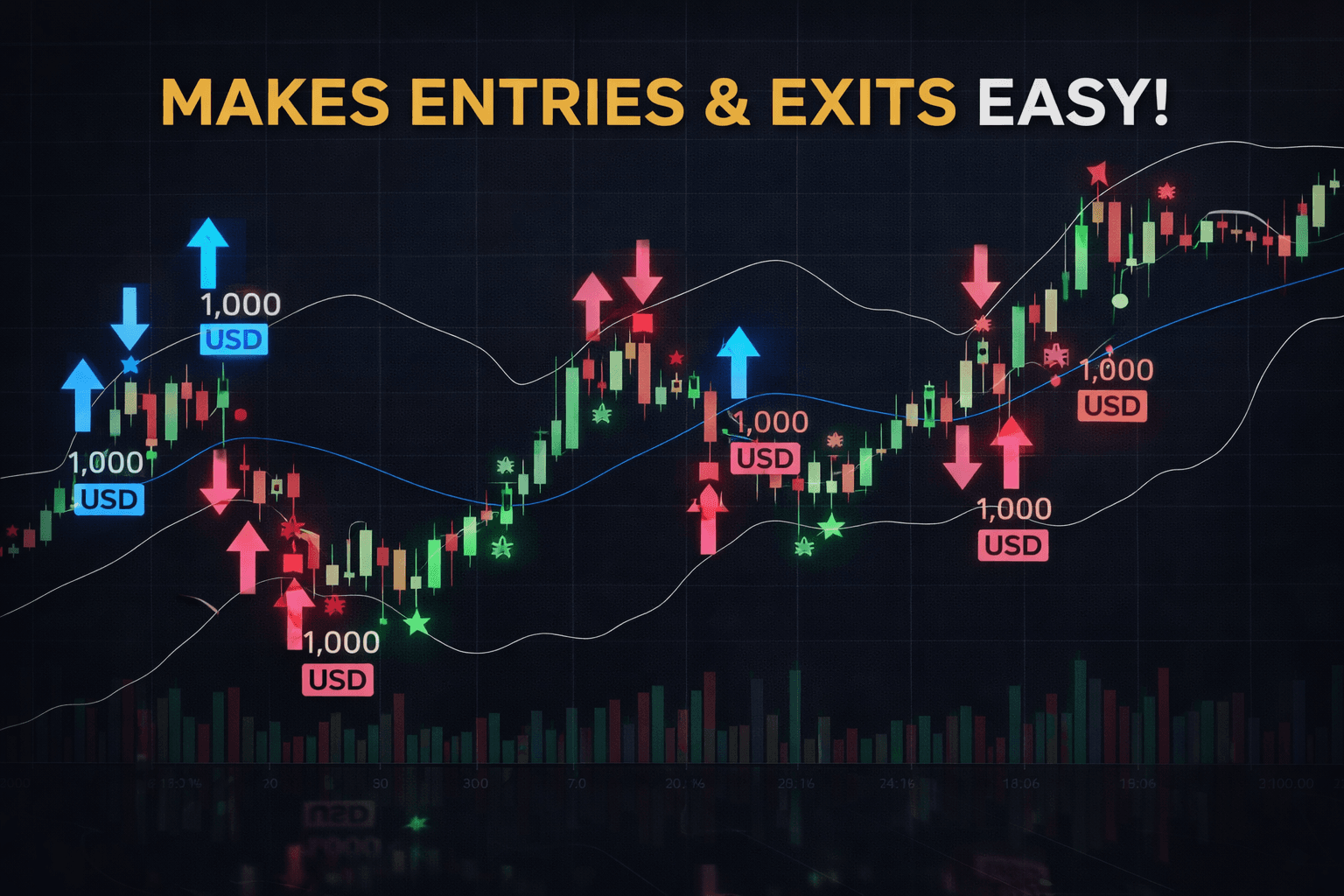
🔼 The blue upwards pointing arrows indicate long entries.
🔽 The pink downward pointing arrows indicate close signals from the previous long entry signal.
🔽 The red downward pointing arrows indicate short entries.
🔼 The pink upwards pointing arrows indicate close signals from the previous short entry signal.
The numbers under the arrows indicate how much of the asset was purchased. By default, this value is 1,000 USD equivalent but can be changed by the user in the “Properties” tab.
✰ The green stars under the candlestick represent bullish engulfing candlesticks. The visibility, color, and image can be edited in the “Style” tab.
✰ The red stars on top of the candlesticks indicate bearish engulfing candlesticks. The visibility, color, and image can be edited in the “Style” tab.
The blue line is the SMA (Simple Moving Average). The value can be adjusted in the “Inputs” tab. The visibility and color can be edited in the “Style” tab.
The white lines indicate the upper, middle, and lower ranges of the Bollinger Bands. The “Middle Band Length”, “BB Source”, and “Standard Deviation” values can be adjusted in the “Inputs” tab. The visibility and color can be edited in the “Style” tab.
INPUTS
Apply Stoch – By checking this box you apply a stochastic filter to the conditions for long entries.
Short Engulfing – By checking this box you enable short trade entry conditions for short engulfing patterns that occur after an uptrend swing has ended.
RSI Long – By checking this box you apply an RSI SMA filter to the conditions for long entries.
Trailing Stop Loss – By checking this box you apply a trailing stop loss to the strategy back tester. If this is not enabled, then the back tester will use the values of “Stop Loss %” and “Profit Take %”.
Stop Loss % – The strategy will close a trade for a loss at this value which can be edited by the user.
Profit Take % – The strategy will close a trade for a profit at this value which can be edited by the user.
Trailing Stop Long % – The strategy will implement a trailing stop for long positions at this value if the “Trailing Stop Loss” box is checked. If the value is 100, the trailing stop loss is disabled and only the strategy close condition will be used.
Trailing Stop Short % – The strategy will implement a trailing stop for Short positions at this value if the “Trailing Stop Loss” box is checked. If the value is 100, the trailing stop loss is disabled and only the strategy close condition will be used.
Start Month – Input the month number for the back test beginning here.
Start Day – Input the day number for the back test beginning here.
Start Year – Input the year number for the back test beginning here.
End Month – Input the month number for the back test ending here.
End Day – Input the day number for the back test ending here.
End Year – Input the year number for the back test ending here.
SMA Source – Input the number to use as the simple moving average source value.
SMA Length – Input the number to use as the simple moving average source length.
RSI Source – Input the number to use as relative strength index source value.
BB Middle Band Length – Input the number to take the middle band of the bollinger bands value from.
BB Source – Input the number to take the bollinger bands source value from.
Standard Deviation – Input the number to take the standard deviation of the bollinger bands from.
Close After Sessions LONG – This value will force close a long position after the number of candlesticks specified regardless of profits or loss.
Close After Sessions SHORT – This value will force close a short position after the number of candlesticks specified regardless of profits or loss.
PROPERTIES
Initial Capital – The amount of capital in the total portfolio. 1,000 by default.
Base Currency – The currency to be used as base. USD by default.
Order Size – The amount of funds per trade; base currency, percent equity, or contracts.
Pyramiding – How many orders for a single trade. 1 by default.
Commission – Exchange/broker commission rates. 0 by default.
Verify Price For Limit Orders – Ticks past limit for an order fill. 0 by default.
Slippage – Ticks added to fill price of market stop orders. 0 by default.
Margin For Long Positions – Percent of equity for long positions. 0 by default.
Margin For Short Positions – Percent of equity for short positions. 0 by default.
Recalculate – Post-order fill recalculations; real time bar updates.
STYLE
SMA – Simple moving average as a line. Visibility and color changeable. Check box to enable/disable.
Middle Band – Middle band of the bollinger bands as a line. Visibility and color changeable. Check box to enable/disable.
Upper Band – Upper band of the bollinger bands as a line. Visibility and color changeable. Check box to enable/disable.
Lower Band – Lower band of the bollinger bands as a line. Visibility and color changeable. Check box to enable/disable.
Bearish Engulfing – Plots bearish engulfing candlesticks. Visibility, color, and image changeable. Check box to enable/disable.
Bullish Engulfing – Plots bullish engulfing candlesticks. Visibility, color, and image changeable. Check box to enable/disable.
Trades On Chart – Add/remove trade arrows, signal labels, entry quantities from chart. Check box to toggle.
Signal Labels – Add/remove strategy direction text from trades on chart. Check box to toggle.
Quantity – Add/remove quantity of asset purchased from trades on chart. Check box to toggle.
Precision – N/A Value.
Labels On Price Scale – Add/remove labels from the price scale. Check box to toggle.
Values In The Status Line – Remove values from the status line of the indicator. Check box to toggle.
VISIBILITY
Set the time frames you would like the strategy back tester to be visible on.
Disclaimer: This content is for educational and informational purposes only and is not financial advice. Nothing here is a recommendation to buy or sell any asset or use any platform. Do your own research and manage your risk.
What we loved
- •Highly customizable
- •Built-in risk management options
- •Backtesting built-in
Room for improvement
- •Limited short-side design
- •Complexity for beginners
- •No guarantee of edge